
XML to YAML Converter
Table of Contents
- Convert any XML into reader-friendly YAML format with PicoToolkit
- How to use
- Conversion rules (what to expect)
- Examples (copyable)
- 1) Simple elements and empty tags
- 2) Element with attributes only
- 3) Repeated elements → list
- 4) Repeated complex elements → list of mappings
- 5) Empty, explicit-empty and whitespace-only nodes
- 6) Entities and CDATA
- 7) Mixed inline content (text + inline tags)
- 8) Namespaces and prefixed elements
- Tips & edge cases
- Related tools
- FAQ
- How do attributes appear in YAML?
- Does the tool preserve namespaces?
- Are entities and CDATA handled differently?
- Can I upload files?
- Can I change output indentation?
Convert any XML into reader-friendly YAML format with PicoToolkit
Convert any XML into reader-friendly YAML format with PicoToolkit
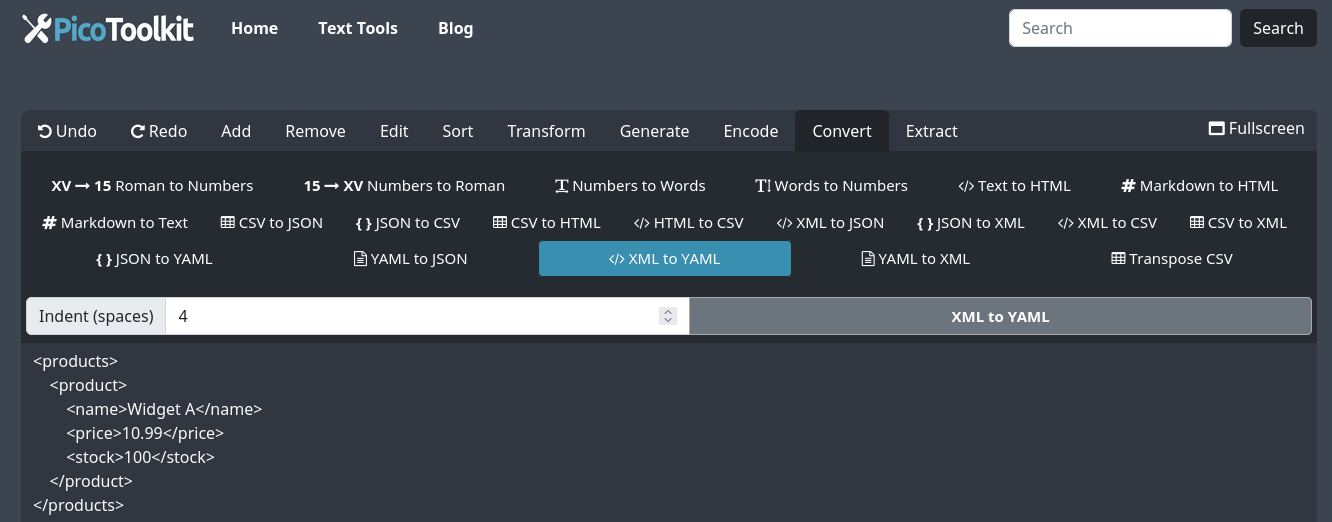
Quickly turn XML into clean YAML you can read, edit, and copy. The converter is browser-based — paste your XML, set indentation, convert, then copy the result.
How to use
- Paste your XML into the input area (copy & paste only — no file upload).
- Click Convert. The YAML appears in the output panel — use Copy to grab the result.
- Use the YAML directly in configs, scripts, or downstream tools.
Conversion rules (what to expect)
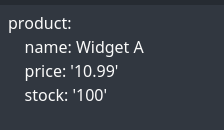
- Top-level children of the XML root become top-level YAML keys (the root element is not preserved).
- Elements that contain only text become scalar values (key: text).
- Empty elements and self-closing tags become empty mappings (key: {}).
- Attributes are ignored by the YAML output (they do not become keys or values).
- Repeated sibling elements with the same name become YAML lists.
- Whitespace-only element content is preserved as a string.
- HTML/XML entities (e.g. <, >, &) are decoded into characters in text nodes.
- CDATA sections and mixed or complex nodes are represented as mappings ({} or child mappings) depending on presence of child elements.
- Namespace prefixes are preserved in element names (for example x:item becomes the key "x:item").
Examples (copyable)
1) Simple elements and empty tags
Input XML:
<root>
  <a id="1" />
  <b id="2">text</b>
  <c>text</c>
</root>

Output YAML:
a: {}
b: text
c: text
2) Element with attributes only
Input XML:
<root>
  <item count="10" active="true" price="19.99" code="0010"/>
</root>

Output YAML:
item: {}
3) Repeated elements → list
Input XML:
<root>
  <tag>one</tag>
  <tag>two</tag>
  <tag>three</tag>
</root>

Output YAML:
tag:
  - one
  - two
  - three
4) Repeated complex elements → list of mappings
Input XML:
<root>
  <user id="u1"><name>Alice</name></user>
  <user id="u2"><name>Bob</name></user>
</root>

Output YAML:
user:
  - name: Alice
  - name: Bob
5) Empty, explicit-empty and whitespace-only nodes
Input XML:
<root>
  <e1/>
  <e2></e2>
  <e3>   </e3>
  <e4><child/></e4>
</root>

Output YAML:
e1: {}
e2: {}
e3: '   '
e4:
  child: {}
6) Entities and CDATA
Input XML:
<root>
<plain><b>bold</b> & stuff</plain>
<cdata><![CDATA[<b>bold</b> & stuff]]></cdata>
</root>
Output YAML:
plain: <b>bold</b> & stuff
cdata: {}7) Mixed inline content (text + inline tags)
Input XML:
<root>
  <p>Hello <b>world</b> and <i>friends</i>!</p>
</root>

Output YAML:
p:
  b: world
  i: friends
8) Namespaces and prefixed elements
Input XML:
<root xmlns="urn:default" xmlns:x="urn:x" xmlns:y="urn:y">
  <x:item y:id="123">value</x:item>
  <item x:flag="1">v2</item>
</root>

Output YAML:
x:item: value
item: v2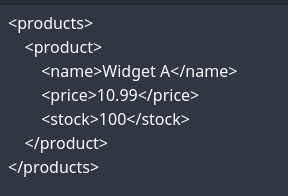
Tips & edge cases
- If you need attributes preserved, export the XML first into a format that keeps attributes as elements (this tool drops attributes).
- Mixed content (text plus child elements) will prioritize child elements in YAML; surrounding plain text may be omitted.
- Large or deeply nested XML is supported, but use increased indentation carefully to keep readability.
- Namespaces are kept as part of the element name (prefix:key).
- Use the indentation option to match your project's YAML style.
Related tools
- YAML to XML
- YAML to JSON
- JSON to YAML
- XML to JSON
- XML to CSV
- Works well alongside other PicoToolkit converters: YAML to XML, YAML to JSON, and JSON to YAML.
FAQ
How do attributes appear in YAML?
Attributes are ignored by this converter. If an element has attributes but no child elements or text, the element becomes an empty mapping ({}). If it has text content, the element becomes the scalar text value.
Does the tool preserve namespaces?
Yes — namespace prefixes are preserved as part of the element name (for example x:item becomes the key "x:item").
Are entities and CDATA handled differently?
Entity references in text nodes are decoded (e.g. &lt; → <). CDATA sections are treated as complex content and are represented as mappings ({} or child mappings) depending on whether they include child elements.
Can I upload files?
No — this converter works via copy & paste in the browser input area only.
Can I change output indentation?
Yes — use the indentation control to set the number of spaces for YAML output to match your project's style.