
XML to JSON Converter
Table of Contents
- XML to JSON — convert XML to JSON online
- How to use
- Parsing rules — what the tool does (summary)
- Examples — pretty printed inputs and outputs (2-space JSON)
- Example 2 — repeated elements → array
- Example 3 — nested + mixed text + children
- Example 4 — namespaces
- Example 5 — CDATA and special characters
- Example 6 — empty tags and nil-like patterns
- Example 7 — lists at multiple levels
- Example 8 — same name, different structure
- Example 9 — larger realistic invoice
- Example 10 — comments & processing instructions
- Tips & edge cases
- Related tools
- FAQ
- Are XML attributes included in the JSON output?
- How are repeated elements handled?
- How does the converter treat mixed content and CDATA?
- What if my XML is malformed or produces a parser error?
- Is the output UTF‑8 and can I control formatting?
Unlock Seamless XML to JSON Conversion with PicoToolkit
XML to JSON — convert XML to JSON online
Working on: xml-to-json
PicoToolkit turns XML into JSON so you can work with web APIs, config files, or scraped data in JavaScript-friendly format. Choose pretty-printing from the UI (Tab, 2 spaces, 4 spaces, or no formatting). Below are example scenarios showing the actual converter behavior and the exact outputs you can expect (examples use 2-space pretty print where JSON is shown pretty).
How to use
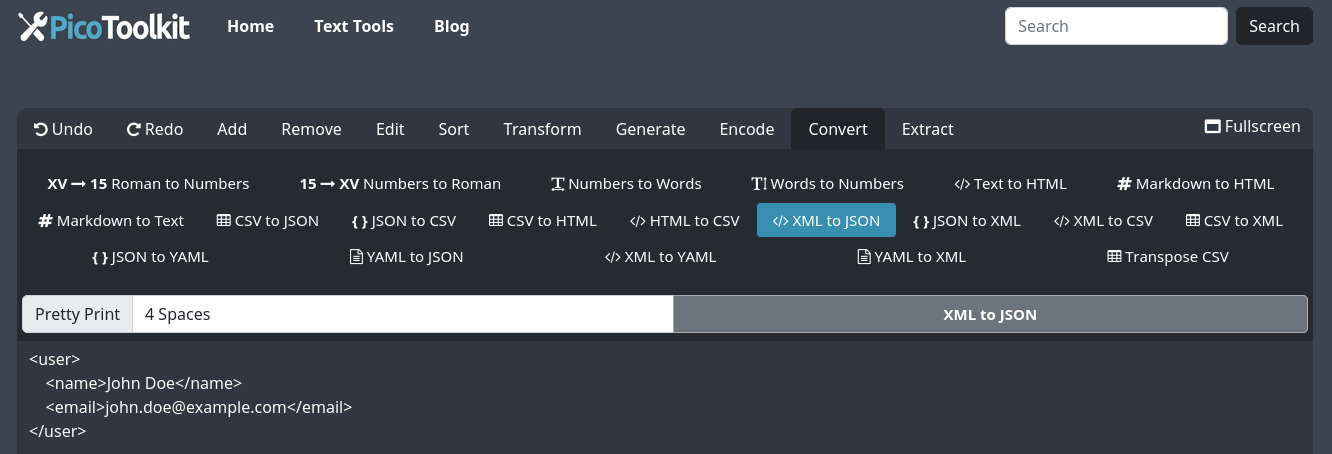
- Paste your XML into the editor.
- Open the menu: Convert → XML to JSON.
- Choose pretty formatting (Tab / 2 spaces / 4 spaces / no formatting) and apply. Copy the JSON output.
Parsing rules — what the tool does (summary)
- Elements → keys: XML elements become JSON properties named after the element (prefixes kept, see namespaces example).
- Text nodes: if an element contains only text, the JSON value is that text (string).
- Elements with children: become objects. If an element has both text and child elements, the converter prefers child elements and surrounding standalone text is not preserved.
- Attributes: attributes are not promoted to properties in the JSON output in the default mapping (they are ignored in these examples).
- Repeated sibling elements: when the same element name appears multiple times under one parent, they are collected into an array.
- Namespaces: element names keep their prefixes (e.g.,
ns:item), namespace URIs are not added to the JSON object. - CDATA: CDATA sections are parsed by the XML parser; depending on content they may not appear as plain strings in the default mapping (see example).
- Empty elements: empty tags become empty objects; elements containing only whitespace keep that whitespace as a string.
- Comments & processing instructions: ignored. XML declaration is ignored.
- Malformed XML: the converter will return a parser error object for invalid input.
- Encoding: input is treated as UTF‑8.
Examples — pretty printed inputs and outputs (2-space JSON)
Example 2 — repeated elements → array
Input XML (escaped):
<orders>
  <order id="A1"><total>399.99</total><currency>PLN</currency></order>
  <order id="A2"><total>129.00</total><currency>PLN</currency></order>
  <order id="A3"><total>0</total><currency>PLN</currency></order>
</orders>

Output JSON (2-space pretty):
{
  "orders": {
    "order": [
      {
        "total": "399.99",
        "currency": "PLN"
      },
      {
        "total": "129.00",
        "currency": "PLN"
      },
      {
        "total": "0",
        "currency": "PLN"
      }
    ]
  }
}
Example 3 — nested + mixed text + children
Input XML (escaped):
<product sku="GYM-20">
  <name>Hantle 20 kg</name>
  <desc>Solidne <b>żeliwne</b> hantle z uchwytem.</desc>
  <price net="399.99" vat="23">399.99</price>
</product>

Output JSON (2-space pretty):
{
  "product": {
    "name": "Hantle 20 kg",
    "desc": {
      "b": "żeliwne"
    },
    "price": "399.99"
  }
}
Example 4 — namespaces
Input XML (escaped):
<ns:feed xmlns:ns="https://example.com/ns" xmlns:x="https://example.com/x">
  <ns:item x:id="1"><ns:name>Alpha</ns:name></ns:item>
  <ns:item x:id="2"><ns:name>Beta</ns:name></ns:item>
</ns:feed>

Output JSON (2-space pretty):
{
  "ns:feed": {
    "ns:item": [
      {
        "ns:name": "Alpha"
      },
      {
        "ns:name": "Beta"
      }
    ]
  }
}
Example 5 — CDATA and special characters
Input XML (escaped):
<note>
<subject>Test & Encode</subject>
<body>\nLine2 & stuff \"quotes\" 'apos'\n"
}
}
}
Example 6 — empty tags and nil-like patterns
Input XML (escaped):
<fields>
  <a></a>
  <b/>
  <c> </c>
  <d xsi:nil="true" xmlns:xsi="http://www.w3.org/2001/XMLSchema-instance"/>
</fields>

Output JSON (2-space pretty):
{
  "fields": {
    "a": {},
    "b": {},
    "c": " ",
    "d": {}
  }
}
Example 7 — lists at multiple levels
Input XML (escaped):
<catalog>
  <category name="Siłownia">
    <item><id>1</id><name>Ławka</name></item>
    <item><id>2</id><name>Drążek</name></item>
  </category>
  <category name="Akcesoria">
    <item><id>3</id><name>Guma</name></item>
  </category>
</catalog>

Output JSON (2-space pretty):
{
  "catalog": {
    "category": [
      {
        "item": [
          {
            "id": "1",
            "name": "Ławka"
          },
          {
            "id": "2",
            "name": "Drążek"
          }
        ]
      },
      {
        "item": {
          "id": "3",
          "name": "Guma"
        }
      }
    ]
  }
}
Example 8 — same name, different structure
Input XML (escaped):
<data>
  <value>123</value>
  <value><inner>abc</inner></value>
  <value/>
</data>

Output JSON (2-space pretty):
{
  "data": {
    "value": [
      "123",
      {
        "inner": "abc"
      },
      {}
    ]
  }
}
Example 9 — larger realistic invoice
Input XML (escaped):
<invoice number="FV/2026/01/0001" issuedAt="2026-01-23">
  <seller>
    <name>Gorilla Sports</name>
    <nip>5210000000</nip>
  </seller>
  <buyer>
    <name>ACME Sp. z o.o.</name>
    <nip>1130000000</nip>
  </buyer>
  <items>
    <item sku="KET-16">
      <name>Kettlebell 16 kg</name>
      <qty>2</qty>
      <unitPrice>199.50</unitPrice>
    </item>
    <item sku="MAT-01">
      <name>Mata treningowa</name>
      <qty>1</qty>
      <unitPrice>79.00</unitPrice>
    </item>
  </items>
  <totals>
    <net>478.00</net>
    <vat>109.94</vat>
    <gross>587.94</gross>
    <currency>PLN</currency>
  </totals>
</invoice>

Output JSON (2-space pretty):
{
  "invoice": {
    "seller": {
      "name": "Gorilla Sports",
      "nip": "5210000000"
    },
    "buyer": {
      "name": "ACME Sp. z o.o.",
      "nip": "1130000000"
    },
    "items": {
      "item": [
        {
          "name": "Kettlebell 16 kg",
          "qty": "2",
          "unitPrice": "199.50"
        },
        {
          "name": "Mata treningowa",
          "qty": "1",
          "unitPrice": "79.00"
        }
      ]
    },
    "totals": {
      "net": "478.00",
      "vat": "109.94",
      "gross": "587.94",
      "currency": "PLN"
    }
  }
}
Example 10 — comments & processing instructions
Input XML (escaped):
<?xml version="1.0" encoding="UTF-8"?>
<?tool mode="test"?>
<root>
  <!-- comment should be ignored -->
  <x>1</x>
  <y>2</y>
</root>

Output JSON (2-space pretty):
{
  "root": {
    "x": "1",
    "y": "2"
  }
}
Tips & edge cases
- If the converter returns a parser error, check that you pasted only the XML fragment (no surrounding HTML) and that the XML is well-formed.
- Attributes are not included in the JSON output in the examples above. If you need attributes preserved, pre-process the XML or use a script that maps attributes to properties before conversion.
- To preview structure before converting, try XML to CSV or visually inspect with JSON to XML round-trip.
- Use the pretty-print option in the UI (Tab / 2 spaces / 4 spaces / no formatting) to get readable JSON for copy/paste into code editors.
Related tools
- JSON to XML — convert back when needed.
- XML to CSV — extract table-like data first.
- XML to YAML and JSON to YAML — other format conversions.
- HTML stripper and Find and Replace — useful pre/post-processing steps.
FAQ
Are XML attributes included in the JSON output?
In the converter behavior shown above, attributes are not promoted to JSON properties. If you need attributes preserved, run a pre-processing step to convert attributes into child elements or use a different mapping tool.
How are repeated elements handled?
Repeated sibling elements are collected into JSON arrays when more than one occurrence exists under the same parent.
How does the converter treat mixed content and CDATA?
When an element contains both text and child elements, the examples show child elements preserved while standalone surrounding text may be dropped. CDATA behavior depends on the parser; in the provided example CDATA is represented under a #cdata key.
What if my XML is malformed or produces a parser error?
The tool will return a parser error object. Make sure your XML is well-formed (single root element, properly closed tags) and contains no surrounding HTML before converting.
Is the output UTF‑8 and can I control formatting?
Yes — input/output assume UTF‑8. You can choose pretty formatting in the UI: Tab, 2 spaces, 4 spaces, or no formatting (compact JSON).