
Random IP Generator
Random IP Generator — generate IPv4 & IPv6 lists
Random IP Generator — generate IPv4 & IPv6 lists
PicoToolkit produces purely random IPv4 and IPv6 addresses in bulk (up to 2,000 per run). Paste or pick options in the toolbar, then copy the generated list to your clipboard for testing, QA, or simulation.
How to use
- Open the tool: Generate → IPs.
- Select IP version: IPv4 or IPv6.
- Enter the number of addresses to generate (maximum 2,000).
- Click Generate. Results appear one-per-line in the output area. Use Copy to copy them to clipboard.
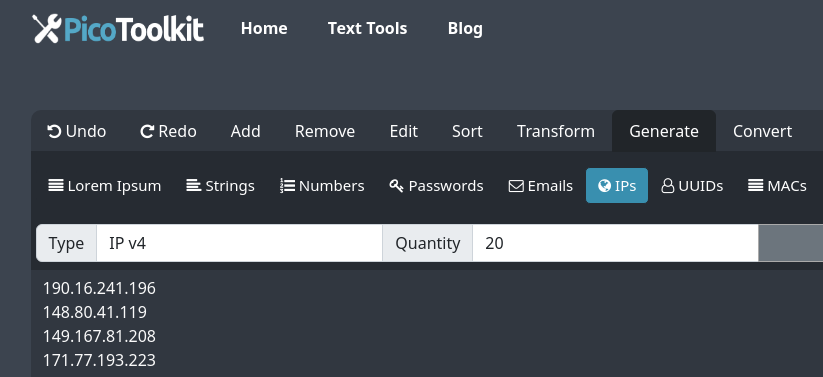
Behavior — what to expect
- Pure randomness: addresses are sampled uniformly at random across the full address space for the chosen IP version. This means public, private, multicast, loopback and reserved addresses may appear.
- Duplicates: duplicates are possible in large batches because generation is random. If you need unique lists, post-process with Remove Duplicates.
- IPv4 format: dotted‑decimal (e.g., 203.0.113.45).
- IPv6 format: canonical compressed form (e.g., 2001:db8::1a2b:3c4d).
- No CIDR/subnet mode: the tool does not generate addresses limited to a user-provided CIDR or subnet.
- Client-side: generation runs in your browser — the tool does not upload generated addresses to the server.
- Output: plain text, one address per line ready to copy. Use other PicoToolkit converters (CSV workflows) if you need a different export format.
Examples (copyable)
Example — 5 random IPv4 addresses
203.0.113.45
18.212.10.7
172.20.14.99
8.8.4.4
192.0.2.254
Example — 3 random IPv6 addresses
2001:db8::1
fe80::7a2b:3cff:fe4d:1a2b
2607:f8b0:4005:805::200e
Note: Examples above are illustrative. Real runs produce different random addresses each time and may include private/reserved addresses.
Tips & workflows
- To create test fixtures, generate IPs and combine with other tools: Random Name Generator, Random Email Generator, Random UUID Generator.
- For CSV imports, copy the one‑per‑line output and paste into a spreadsheet or use Convert Newline to Comma to prepare a single-line list.
- If you need to exclude particular ranges, filter the generated list with Find and Replace or a script after copying.
FAQ
Can I limit generation to a subnet or CIDR?
No. This tool generates purely random addresses and does not support CIDR/subnet-bound generation.
Will generated IPs be unique?
No guarantee of uniqueness. For deduplication, run the output through Remove Duplicates before importing.
Are generated IPs logged or sent to the server?
Generation runs client-side in your browser; the tool does not upload generated addresses. If you need stronger privacy guarantees, check the site privacy policy linked in the footer.