
Markdown to Text Converter
Table of Contents
- What this Markdown to Text tool does
- How to convert Markdown to plain text online
- Examples: Markdown vs plain text output
- Basic formatting (headings, bold, italics)
- Lists, links and inline code
- From messy Markdown to clean normal text
- When should you convert Markdown to normal text?
- Blogging and content editing
- Developers and documentation
- Collaboration and sharing
- Text analysis, SEO and cleanup
- FAQ: Markdown to text & MD to TXT
- Is this Markdown to text converter free?
- Does it work with .md files from GitHub and other editors?
- Can I convert large Markdown documents to plain text?
- What’s the difference between Markdown to text and Markdown to HTML?
- Does this tool remove all Markdown formatting from text?
- Related tools on PicoToolkit
Online MD to TXT & plain text
Need to turn a block of Markdown into simple, readable text with no #, * or link syntax getting in the way? This Markdown to text converter does exactly that: you paste your Markdown, PicoToolkit cleans it up and gives you clean plain text you can drop into emails, docs, CMSes or any other editor that doesn’t speak Markdown.
What this Markdown to Text tool does
This online Markdown to text converter takes any Markdown content and turns it into plain, normal text. Headings, bold, italics, lists, links, code blocks – the tool removes the Markdown syntax and keeps only the readable content.
It’s useful whenever you like writing in Markdown, but the final destination doesn’t support it: email clients, basic CMS fields, older editors, internal tools or simple .txt files. Instead of manually deleting hashes, stars and brackets, you do it in one click.
If you actually want formatted HTML from your Markdown, use the Markdown to HTML Converter. If you need to go the other way and turn HTML into Markdown, there is a separate HTML to Markdown Converter. This page is focused purely on converting Markdown to plain text.
How to convert Markdown to plain text online
The tool is meant to be quick: open, paste, convert, copy, done. No sign-up, no extra software, no configuration.
- Paste or type your Markdown into the editor on the left. You can copy it from a
.mdfile, a GitHub README, a note-taking app or anywhere else. - Choose the Markdown to Text option from the menu or click the corresponding button above the editor.
- The converted plain text appears in the output area. Copy it to your clipboard or save it as a TXT file in your own editor.
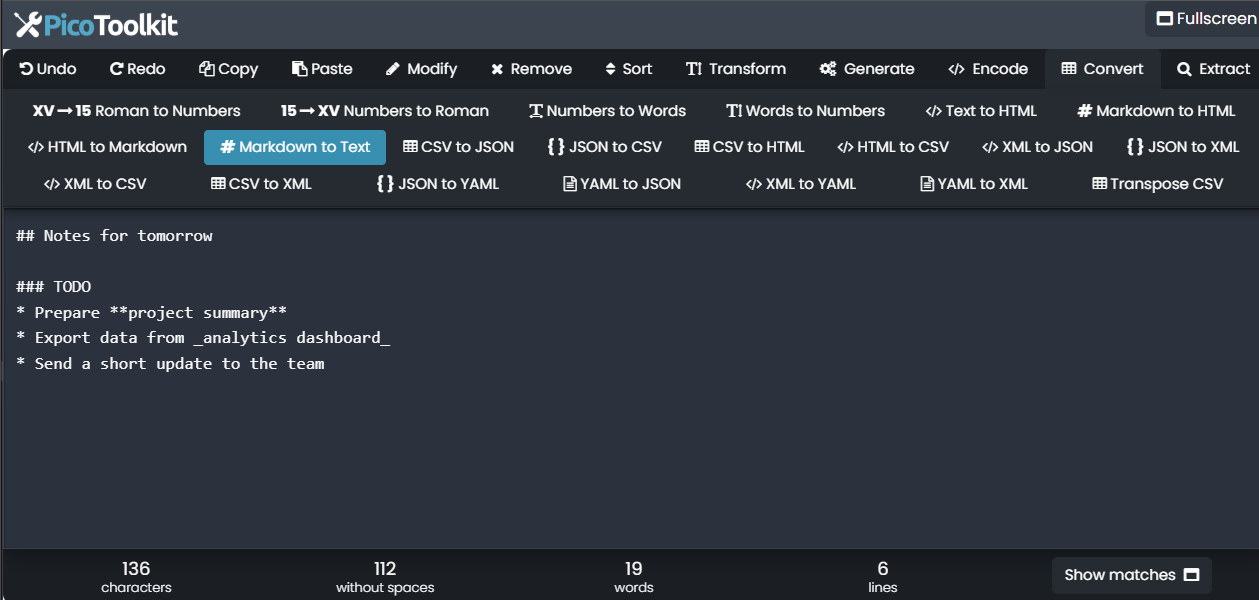
That’s all you need to turn Markdown into simple text that works in any environment. It’s perfect for quick md to text conversions when you’re in a hurry.
Examples: Markdown vs plain text output
Here are a few short examples so you can see how the converter handles different pieces of Markdown and what the plain text output looks like.
Basic formatting (headings, bold, italics)
Markdown input:
# Weekly report

This is **important** and this is *optional*.
Plain text output:
Weekly report

This is important and this is optional.
Lists, links and inline code
Markdown input:
- Learn Markdown
- Write docs in `README.md`
- Share the link: [project page](https://example.com)
Plain text output:
Learn Markdown
Write docs in README.md
Share the link: project page (https://example.com)
From messy Markdown to clean normal text
Markdown input:
### Notes for tomorrow

* Prepare **project summary**
* Export data from _analytics dashboard_
* Send a short update to the team
Plain text output:
Notes for tomorrow

Prepare project summary
Export data from analytics dashboard
Send a short update to the team
When should you convert Markdown to normal text?
Converting Markdown to normal text sounds simple, but it solves a bunch of everyday annoyances. Here are a few common situations where this tool tends to shine.
Blogging and content editing
Maybe you draft posts in Markdown, but your editor, CMS or newsletter tool expects plain text. Instead of fixing every heading and list by hand, you convert everything in one go and keep writing. It’s also handy if you want a clean text version of your article for proofreading or translations.
Developers and documentation
Documentation often lives in .md files on GitHub or in internal repos. Sometimes you need that content in tools that know nothing about Markdown: ticketing systems, internal portals, legacy apps. A quick markdown to plain text conversion keeps the wording and removes the markup.
Collaboration and sharing
Not everyone on your team is comfortable with Markdown. Sending them normal text avoids confusion and “what are all these brackets?” questions. You write in the format you like, then use the converter before sharing.
Text analysis, SEO and cleanup
When you run content through SEO tools, keyword analyzers or simple scripts, you usually want raw text only. This Markdown to text converter strips formatting, leaving a clean string that’s much easier to process or compare.
FAQ: Markdown to text & MD to TXT
Is this Markdown to text converter free?
Yes, you can use this tool for free directly in your browser. There’s nothing to install and no account required for basic Markdown to text conversions.
Does it work with .md files from GitHub and other editors?
As long as you can open the file and copy the content, you’re good. Paste the Markdown from your editor, GitHub, Notion or any other tool into the input area and the converter will handle the syntax in the same way.
Can I convert large Markdown documents to plain text?
For typical blog posts, documentation pages and notes, everything should work smoothly. If you paste very large documents, performance depends on your browser, but the conversion itself is still the same: Markdown in, plain text out.
What’s the difference between Markdown to text and Markdown to HTML?
Markdown to text removes the formatting syntax and leaves only the words. Markdown to HTML keeps the structure and turns headings, lists and links into proper HTML tags. If you want formatted web content, use Markdown to HTML Converter; if you just want a simple readable version, stay on this page.
Does this tool remove all Markdown formatting from text?
The goal is to strip common Markdown syntax such as hashes for headings, stars, underscores, backticks and basic link notation, while leaving your actual text intact. That gives you a clean, normal text version that’s easy to reuse anywhere.
Related tools on PicoToolkit
If you work with text a lot, these other tools on PicoToolkit might also be useful:
- Markdown to HTML Converter – turn Markdown into structured HTML while keeping all headings, lists and links.
- HTML to Markdown Converter – convert existing HTML pages or snippets into clean Markdown for docs and repos.
- Text to HTML – wrap plain text in simple HTML tags for quick web publishing.
- HTML tag remover – paste HTML and extract just the visible text, similar to this tool but for HTML instead of Markdown.