
Markdown to HTML Converter
Table of Contents
- What this Markdown to HTML converter does
- How to use the Markdown to HTML tool
- Examples: Markdown to HTML output
- Headings and basic formatting
- Lists and links
- When to convert Markdown to HTML
- Blog posts and content pages
- Developer documentation
- Emails and templates
- Training materials and educational content
- FAQ: converting Markdown to HTML
- Is this Markdown to HTML converter free?
- Does it work with .md files from GitHub and other editors?
- What kind of HTML does the converter generate?
- Can I use the HTML on any website?
- What if I only need the text without formatting?
- Related tools on PicoToolkit
Effortlessly Transforming Markdown into HTML
Like writing in Markdown but need proper HTML at the end of the day? This online Markdown to HTML converter turns your Markdown into clean HTML you can paste straight into your website, blog engine or email template.
What this Markdown to HTML converter does
The tool takes your Markdown content and generates structured HTML: headings become <h1>–<h6>, lists turn into <ul> and <ol>, links are wrapped in <a> tags and code blocks get proper markup. You keep the original layout and hierarchy, but in a format your website or CMS actually understands.
It’s useful whenever you write in Markdown but need a final HTML version for a landing page, blog post, documentation site or newsletter. Instead of hand-coding tags or wiring up another build step, you paste the text, run the converter and copy the result.
If you only want the raw text without any formatting, use the Markdown to Text Converter instead. When the starting point is HTML and you need Markdown, there’s a dedicated HTML to Markdown Converter. This page is all about turning Markdown into HTML.
How to use the Markdown to HTML tool
The flow is intentionally simple, so you can convert content in a few seconds:
- Paste or type your Markdown into the editor. It can be a short note, a full article or documentation copied from a
.mdfile when you want to convert .md to HTML online. - Choose Markdown to HTML from the menu or click the matching button above the editor.
- The HTML version appears in the output area. Copy it to your clipboard and drop it into your CMS, template or code editor.
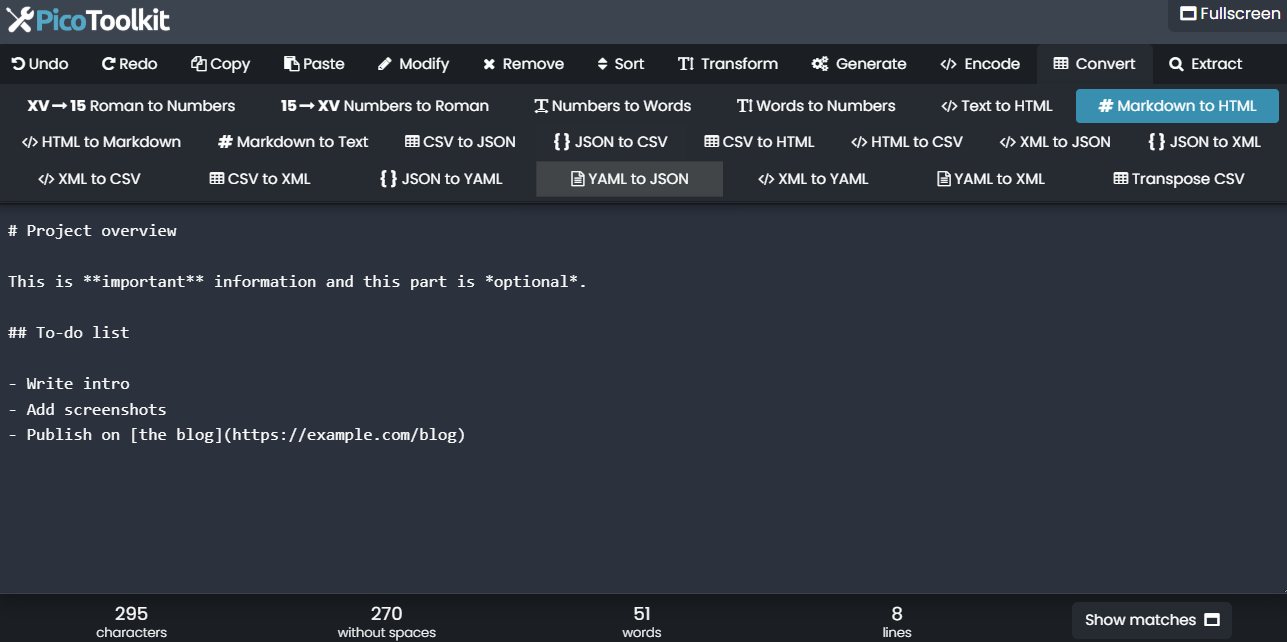
While you work, you can use the preview as a small Markdown to HTML viewer to quickly check if headings, lists and links look the way you expect before you paste the code anywhere else.
Examples: Markdown to HTML output
Here are a few short examples to show how typical Markdown constructs are translated into HTML by the converter.
Headings and basic formatting
Markdown input:
# Project overview

This is **important** information and this part is *optional*.
HTML output:
<h1>Project overview</h1>
<p>This is <strong>important</strong> information and this part is <em>optional</em>.</p>
Lists and links
Markdown input:
## To-do list

- Write intro
- Add screenshots
- Publish on [the blog](https://example.com/blog)
HTML output:
<h2>To-do list</h2>
<ul>
  <li>Write intro</li>
  <li>Add screenshots</li>
  <li>Publish on <a href="https://example.com/blog">the blog</a></li>
</ul>
When to convert Markdown to HTML
Markdown and HTML work well together. You can write in the format that feels comfortable and convert only when you’re ready to publish. A few common use cases:
Blog posts and content pages
Many people prefer drafting articles in Markdown: it’s quick, easy to read and doesn’t distract with a million buttons. Once the text is ready, you convert it to HTML and paste the result into your CMS or static site generator.
Developer documentation
Documentation often starts as Markdown in a repository. If you want to reuse that content on a marketing site, in help pages or in a knowledge base that expects HTML, a direct Markdown to HTML conversion saves a lot of manual editing.
Emails and templates
Some email tools accept HTML only. You can write the copy in Markdown, use this converter to generate the markup and then plug the HTML into your template without worrying about missing tags.
Training materials and educational content
Teachers and trainers can prepare lessons or assignments in Markdown and then quickly turn them into HTML for online handouts, course platforms or internal portals.
FAQ: converting Markdown to HTML
Is this Markdown to HTML converter free?
Yes, you can use it directly in your browser without creating an account or installing anything. Paste Markdown, generate HTML, repeat as often as you like when you need to convert Markdown to HTML online.
Does it work with .md files from GitHub and other editors?
As long as your editor produces standard Markdown, it should work fine. Open the .md file, copy the content, paste it into the tool and convert it to HTML in one step.
What kind of HTML does the converter generate?
The output is regular, readable HTML with tags such as <h1>, <p>, <ul>, <ol>, <a> and <code>. You can style it with your own CSS or drop it into an existing layout.
Can I use the HTML on any website?
In most cases, yes. The code is plain HTML, so it will work in typical CMSes, static site generators and hand-written templates. If your platform has special restrictions, you can still edit the output before publishing.
What if I only need the text without formatting?
In that case it’s better to use the Markdown to Text Converter, which removes the formatting syntax and leaves just the words.
Related tools on PicoToolkit
If you work with Markdown and HTML a lot, these tools often go together with the converter on this page:
- Markdown to Text Converter – remove Markdown syntax and keep only plain text when you don’t need markup.
- HTML to Markdown Converter – take existing HTML and turn it into Markdown for repos, wikis or docs.
- Text to HTML – wrap plain text in simple HTML tags for quick publishing.
- HTML tag remover – paste HTML and pull out just the visible text if you need to clean existing pages.