
SHA-512 Hash Generator
Table of Contents
- Generate SHA-512 — create a 128‑char hex checksum
- How to use
- Common use cases
- Examples (copyable)
- Technical details & behavior
- Security note (passwords and sensitive data)
- Related tools
- Tips & edge cases
- FAQ
- Can the tool hash files or only pasted text?
- Is the output uppercase or lowercase?
- Will the tool add a salt or perform iterations?
- Are there input size limits?
Generate SHA-512 — create a 128‑char hex checksum
Generate SHA-512 — create a 128‑char hex checksum
Working on: sha512
PicoToolkit quickly generates a SHA‑512 hash from text you paste. The tool outputs a lowercase 128‑character hexadecimal checksum you can copy for integrity checks, signatures, or data fingerprinting. This is a one-shot hash (no salt, no stretching) — see the security note below for password guidance.
How to use
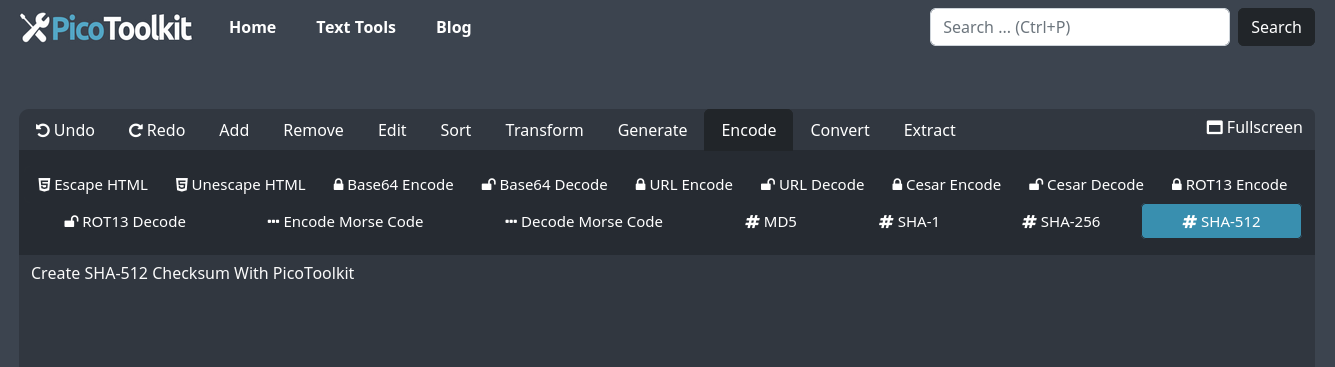
- Paste your text into the editor.
- Open the menu: Encode → SHA-512.
- Result appears as a lowercase 128‑char hex string. Copy it to clipboard or your workflow.
Common use cases
- Verify file or message integrity by comparing checksums.
- Generate deterministic identifiers for data deduplication or caching.
- Produce fingerprints for digital signing workflows (not a substitute for signing).
- Quickly test hash logic during development or debugging.
Examples (copyable)
Example A — empty string
Input:
<empty input>

Output (SHA‑512, hex lowercase, 128 chars):
cf83e1357eefb8bdf1542850d66d8007d620e4050b5715dc83f4a921d36ce9ce47d0d13c5d85f2b0ff8318d2877eec2f63b931bd47417a81a538327af927da3e
Example B — text "abc"
Input:
abc

Output (SHA‑512):
ddaf35a193617abacc417349ae20413112e6fa4e89a97ea20a9eeee64b55d39a2192992a274fc1a836ba3c23a3feebbd454d4423643ce80e2a9ac94fa54ca49f
Note: newlines and all characters are hashed as provided (input is treated as raw UTF‑8). For example, "abc" and "abc\n" will produce different hashes. The tool accepts copy‑pasted text only (no file upload).
Technical details & behavior
- Input encoding: treated as UTF‑8. Characters are hashed exactly as entered (including newlines and trailing spaces).
- Output format: hexadecimal, lowercase, 128 characters (512 bits). No other output formats (base64/binary) are provided.
- No salt, iterations, or key stretching are applied — this is a raw SHA‑512 digest.
- Performance: hashing is done client-side; processing very large inputs depends on your browser and device memory.
Security note (passwords and sensitive data)
SHA‑512 is a cryptographic hash, not encryption. Do NOT use raw SHA‑512 for password storage. For passwords use a dedicated, slow KDF with salt and iterations (PBKDF2, bcrypt, Argon2). SHA‑512 may be appropriate for checksums, but not for protecting user credentials.
Related tools
- MD5 — legacy checksum (fast, broken for collision resistance).
- SHA-1 — deprecated for security‑sensitive uses.
- SHA-256 — SHA‑2 family member with a 256‑bit digest.
- Character Counter — verify input length before hashing.
- Base64 Encoder/Decoder — (if you need alternate encodings for digests).
Tips & edge cases
- If you need a stable identifier for a file’s contents, compute the hash of the exact file payload (ensure you hash the same bytes each time).
- Mind invisible characters: trailing newline or BOM will change the result — use Trim if you want to remove surrounding whitespace first.
- To compare results programmatically, prefer canonical inputs (same encoding, newline normalization).
FAQ
Can the tool hash files or only pasted text?
Only pasted text is supported. For file hashing, use local command‑line tools (e.g., sha512sum) or a dedicated file‑hash utility.
Is the output uppercase or lowercase?
Output is lowercase hexadecimal (128 characters). There is no uppercase option.
Will the tool add a salt or perform iterations?
No. This tool returns the raw SHA‑512 digest. For resistant password storage, use PBKDF2/Argon2/bcrypt with salt and iterations.
Are there input size limits?
There is no hard server limit; hashing is client-side and performance depends on your browser/device. For very large inputs split them or use a local utility.